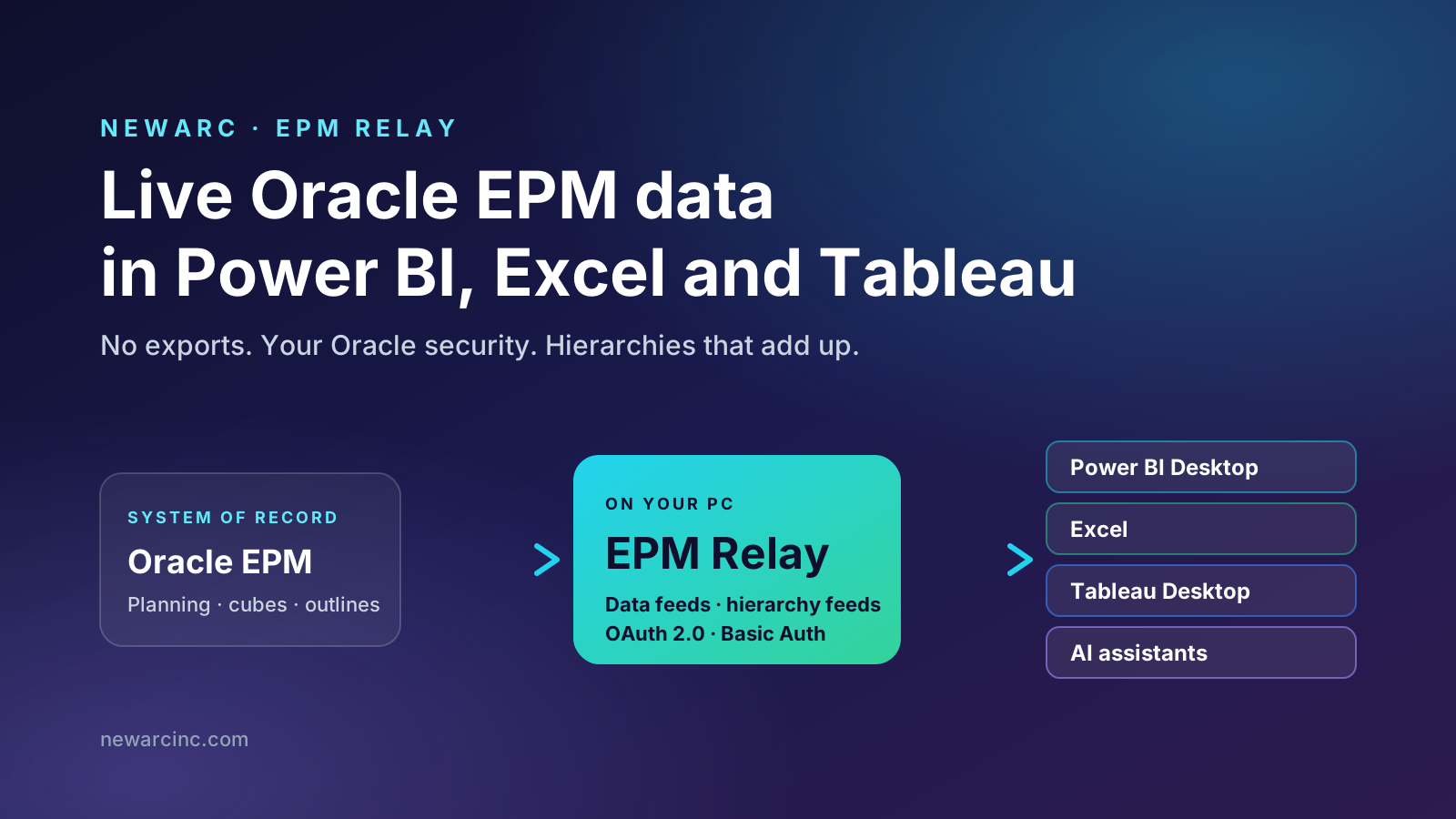
Power BI connects to hundreds of data sources. Oracle EPM Cloud is not one of them. EPM Relay is the connector we built to close that gap, and it keeps the numbers live.
If you run Planning on Oracle EPM Cloud and report in Power BI, you know the routine. Someone runs an export, the file lands in a shared folder, and Power BI refreshes from that file. A week later the CFO asks why the dashboard doesn't match Smart View. The answer is almost always the same: the file is from Tuesday.
We spent a lot of our consulting time building and maintaining those pipelines for clients. EPM Relay started as a way to stop doing that. This article explains what it does, how you set it up, and where it fits next to the reporting tools you already have.
What to remember
- There is no direct Power BI connector for Oracle EPM Cloud. Most teams fill the gap with exports and scheduled files.
- EPM Relay publishes live feeds. Power BI, Excel and Tableau read them like any other data source, with no file in between.
- Your Oracle security still applies. Each feed runs as your own Oracle user, signed in with OAuth 2.0 or Basic Authentication.
- Hierarchies come ready for Power BI. Rollups such as Income Statement and Balance Sheet arrive flattened, and the totals match Oracle.
- Power BI Projects give you a first report in minutes. Pick a feed, and EPM Relay generates a working statement report.
The missing connector
Open Get Data in Power BI Desktop and search for Oracle. You will find Oracle Database and Oracle Essbase. Neither connects to EPM Cloud Planning. Oracle's own analytics story for EPM runs through Smart View, Financial Reports and Oracle Analytics Cloud, which is fine until your organization has standardized on Power BI.
So every team builds a workaround. They usually look like one of these:
- Smart View to Excel to Power BI. Someone refreshes an ad hoc grid, saves the workbook, and Power BI reads it. This works until that person goes on holiday.
- Scheduled exports. A Data Management job or an EPM Automate script exports data to a file each night. Power BI reads the file. The data is only as fresh as the last run, and the script needs someone to maintain it.
- A warehouse in the middle. Data is copied into SQL Server, Snowflake or a lakehouse, and Power BI reports from there. This is robust but slow to build, and you now own a second copy of your plan.
- Custom code against Oracle's APIs. It can be done, but it takes real engineering and the result tends to belong to one developer.
These workarounds share the same problems:
- The data is stale. Planning is iterative. During a forecast cycle the numbers change every hour, and yesterday's export is already wrong.
- Security is flattened. The export usually runs under a service account that can see everything, so the report has to rebuild access rules that Oracle already had.
- The hierarchies are rebuilt by hand. EPM outlines have shared members, consolidation operators and ragged depths. Somebody recreates them in Excel or DAX, and the totals drift whenever the outline changes.
- They break quietly. A renamed member or a new account can break a pipeline, and nobody finds out until a number looks wrong in a meeting.
What EPM Relay is
EPM Relay is a Windows desktop app that sits between Oracle EPM Cloud and your reporting tools. You sign in to your EPM environment, describe the data you want, and EPM Relay publishes it as a feed: a standard OData address that Power BI, Excel and Tableau can read without any add-in.
You don't install a custom connector in Power BI, and there is no warehouse or middleware server to run. Your reporting tool sees a normal data source with tables and columns. When it refreshes, EPM Relay gets the current numbers from Oracle.
One definition, every tool
Live data, under your own security
"Live" means two things here.
The numbers are current. A feed is a description of the data you want, not a copy of it. When Power BI refreshes, EPM Relay asks Oracle for those numbers again. So a forecast someone changed ten minutes ago shows up in your dashboard on the next refresh. Each feed has a short cache, from one minute to an hour, so ten visuals refreshing at once don't send ten identical requests to Oracle. If you want a snapshot instead, you can freeze a feed. A frozen feed keeps serving the numbers it last fetched until you refresh it yourself, which is useful for a board pack that shouldn't change after sign-off.
The security is yours. EPM Relay calls Oracle with your own user, so the feed sees what you would see in Smart View. A regional controller gets their region and an administrator gets everything, and Power BI doesn't have to rebuild any of those rules. Your password or sign-in token is kept in Windows Credential Manager, not in a config file. The only party that ever holds your data is Oracle. EPM Relay talks to Newarc for one thing, the license check.
From sign-in to dashboard: the flow
A first setup takes about fifteen minutes. Here are the steps.
Five steps to a live report
Add your EPM environment and sign in with OAuth 2.0 or Basic Authentication.
EPM Relay reads the outline once: dimensions, members, aliases and properties.
Start from a form you already use, or describe a slice in plain language.
Pick a rollup such as Income Statement and get a flattened table, ready to join.
Paste the feed address into Power BI, Excel or Tableau and build.
1. Set up the connection
Give the connection a name and your EPM environment's address, then choose how to sign in:
- OAuth 2.0. This is for organizations that have turned off basic authentication or require single sign-on. You register EPM Relay once in your Oracle Identity Domain. After that, signing in works like pairing a TV app: EPM Relay shows a short code, your browser opens, and you sign in through your normal company login with MFA. EPM Relay then renews the session on its own, so scheduled refreshes don't stop because a token expired overnight.
- Basic Authentication. Enter your user name and password. It is the quickest way to get started, and the password goes straight into Windows Credential Manager.
Once you're signed in, EPM Relay lists the applications and cubes your user can see. Then it's ready.
2. Sync the members
Before building feeds, EPM Relay reads the outline of the cubes you care about: dimensions, members, aliases, account types and the other properties reporting needs. It reads this once and keeps it on your PC, which is why the rest of the app feels fast. You can schedule the sync to run daily or weekly so that new accounts and renamed members show up without anyone remembering to refresh.
3. Create data feeds
A data feed is the set of numbers you want. You can create one in two ways:
- Start from a form. Your planners already have forms that show the right data at the right level. Pick one, and the feed returns the same data. Most teams start this way because the form was already agreed with finance.
- Describe a slice. Choose members for each dimension and say how much of each one you want: just that member, its children, everything below it, or only the lowest level. EPM Relay turns that into a request Oracle can answer. You don't need to write member functions.
Each feed has options that matter in practice. You can show aliases next to member names, so reports show "Product Revenue" instead of "4110". You can skip empty rows, which keeps large, sparse slices small. You can add attribute columns so reports can filter by attributes such as region or product line. Large slices are handled for you, so a feed that would hit Oracle's size limits still comes back complete.
4. Create hierarchy feeds
Data feeds give you numbers. To show them as a statement with Gross Margin, Operating Income and Net Income, Power BI also needs the hierarchy. A hierarchy feed takes a rollup you choose, such as Income Statement, Balance Sheet or Cash Flow, and returns it as a flat table that Power BI can join to. More on why that is harder than it sounds in the next section.
5. Consume the feeds
In Power BI Desktop, choose Get Data → OData feed and paste the EPM Relay address. The navigator lists your feeds as tables. Load the data feed and its hierarchy, join the member column to the hierarchy, and drop a matrix on the page. From then on, Refresh gets live numbers from Oracle.
Hierarchies are the hard part
This is where most EPM-to-Power BI projects get stuck, so it is worth explaining.
An EPM outline is a parent-child tree, and it is more complicated than it looks. A member can appear in several places as a shared member. Some members subtract from their parent, and some are ignored by it. Branches have different depths, so one account sits three levels down while its sibling sits six. Power BI's matrix wants something simpler: a flat table with one column per level and one row per leaf.
If you flatten an outline naively, you get a report that looks right and adds up wrong. Shared members are counted twice, expenses get added to revenue, and Net Income in Power BI doesn't match Net Income in Oracle. Finance teams notice that the first time they look.
A hierarchy feed does the flattening the way an EPM consultant would do it by hand:
| Gen1 | Gen2 | Gen3 | Gen4 |
|---|---|---|---|
| Net Income | Operating Income | Gross Margin | Total Revenue |
| Net Income | Operating Income | Gross Margin | Cost of Sales |
| Net Income | Operating Income | Operating Expenses | Salaries |
| Net Income | Other Income and Expense | Interest Expense |
Each generation gets a name column and an alias column. Ragged branches stay blank past their depth instead of being padded with made-up levels. Shared members are expanded the way Smart View shows them, and each member's sign is kept, so subtotals roll up the same way Oracle rolls them up. When the outline changes, the next member sync updates the hierarchy, and it tells you if the depth changed.
The result is simple to check: Net Income in Power BI matches Net Income in Oracle.
Power BI Projects: a working report in minutes
Connecting the data is half the job. Someone still has to build the report: relationships, sort orders, sign-aware measures, a matrix with proper indentation, and drill-down that doesn't fall apart on ragged branches. That is days of DAX for someone who knows what they're doing.
EPM Relay's Power BI Projects feature does that first build for you.
- Pick a data feed. Its hierarchies come with it. EPM Relay pairs them for you and flags any that would make totals wrong, with a one-click fix.
- Choose the report. EPM Relay looks at the account types in your hierarchies and suggests what you probably want, such as an income statement or a balance sheet. Then you pick the pages: the statement itself, and comparisons such as Actual against Plan when the feed has a scenario to compare.
- Check and create. A short readiness check confirms the feeds are running and the members are synced. EPM Relay then writes a complete Power BI Project, which you open in Power BI Desktop.
You get a real report, with relationships, measures, formatting, statement ordering and a "show full outline" button that resets any drilling. It isn't a template that still needs wiring. It uses Microsoft's standard Power BI Project format, so it fits in source control like any other project.
Projects are saved in EPM Relay. When a feed changes, for example because you added a year, EPM Relay marks the project and you can update it. Pages you added yourself in Power BI Desktop are kept.
Not just Power BI: Excel and Tableau
Because the feeds are standard OData, Power BI is just one tool that can read them.
Pivot tables on live EPM
Data → Get Data → From OData Feed, paste the same address, and load to a pivot table or the data model. Refresh All gets the current numbers. This is useful for analysts who want Excel's flexibility without running Smart View.
The same feeds, another tool
Tableau's OData connector reads EPM Relay feeds directly. Data and hierarchy feeds come in as tables you can relate, so teams that standardized on Tableau get the same live data.
You define the feed once, in one place, under one security model, and every team uses the tool it prefers. When finance and the BI team compare numbers, they're reading the same feed.
Feeds for AI assistants
The question we hear most about AI in finance is "can I trust the numbers?" A language model that guesses a revenue figure is worse than useless.
EPM Relay feeds give AI assistants something solid to work from. A feed is structured data at a known address, with clear tables, member names, aliases and hierarchies. AI tools that run on your desktop, such as Claude, ChatGPT through Codex, and OpenCode, can read a feed and analyze it. You can ask why travel is over plan in EMEA, or for a variance commentary on the latest forecast. The assistant works from the figures Oracle returned to your user, not from a pasted screenshot or its own memory.
The same rules apply as for the BI tools. The assistant only sees what your Oracle user can see. Check your organization's AI policy before sending financial data to an AI provider. And if you want an assistant to work with EPM itself, for example to look up variables, check jobs or explore metadata, that is what our Newarc EPM MCP Server is for. The two products work well together.
Who it is for
- FP&A and finance analysts who report in Power BI or Excel and are tired of explaining why the dashboard is a day behind.
- EPM administrators who maintain export jobs and scripts whose only purpose is to feed a BI tool.
- BI and data teams who have been asked to "add EPM to the dashboard" and don't want to learn Essbase outline semantics to do it.
- Consultants and partners who want to demo live EPM data in Power BI during a workshop, not after a two-week data project.
EPM Relay is not a replacement for Smart View, Financial Reports or Narrative Reporting. Those are still the right tools for data entry, management reporting and the formatted, governed books that go to the board. EPM Relay is for everything around them: dashboards, ad hoc analysis, and getting plan data into the same place as the rest of the business.
Frequently asked questions
Is there a native Power BI connector for Oracle EPM Cloud?
No. Power BI has an Oracle Essbase connector for Essbase, but nothing in Get Data connects to Oracle EPM Cloud Planning. Teams usually export files with Smart View, Data Management or EPM Automate and load those into Power BI. EPM Relay replaces that export step with live feeds.
Does EPM Relay copy my EPM data into a warehouse?
No. EPM Relay runs on your Windows PC and asks Oracle for the numbers when your tool refreshes. A short cache, which you set per feed, keeps repeated refreshes from calling Oracle every time. There is no warehouse and no Newarc server in the data path.
Does it respect Oracle EPM security?
Yes. Every call uses your own Oracle user, so a feed only returns the members and data that user is allowed to see.
Which sign-in methods are supported?
Basic Authentication and OAuth 2.0 through your Oracle Identity Domain. With OAuth you sign in once in the browser, including through your company's single sign-on, and EPM Relay renews the session on its own so scheduled refreshes keep working.
Which tools can read the feeds?
Any tool that reads an OData feed. We test with Power BI Desktop, Excel and Tableau Desktop. AI assistants that run on your machine can read the same feeds.
Try EPM Relay
EPM Relay is in beta with a group of early users on real Planning applications, and we're opening it to more teams. If you report on Oracle EPM in Power BI, Excel or Tableau, we would like to show it to you on your own environment. Email epmrelay@newarcinc.com and tell us what you're reporting on today.
And if you have your own version of the export-and-refresh routine, we would like to hear about that too. Most of what EPM Relay does today started as a client telling us about theirs.